
CapCut and KineMaster both help you turn simple clips into great videos. You can use either app to cut scenes, add music, write text, and apply effects. Both can work well for social media videos, tutorials, and personal projects.
Table of Contents
The better choice depends on how you like to edit. CapCut is worth exploring if you enjoy templates and quick creative tools. KineMaster may suit you if you want to build videos using separate layers and detailed controls. This guide compares their main features in simple words.
What Is CapCut?
CapCut is a video editor available on mobile devices, computers, and the web. It includes tools for trimming clips, joining videos, adding captions, and changing video speed.
You can start a project from scratch or use a template. Templates give you a ready-made style where you add your own photos and clips. CapCut can be used for short social videos as well as longer projects.
What Is KineMaster?
KineMaster is a video editing app for Android and iOS phones and tablets. It lets you arrange videos, pictures, text, and sound in separate layers.
This gives you control over when each item appears and how it looks. You can use it for reels, YouTube videos, lessons, product videos, and other projects.
CapCut vs KineMaster: Features Comparison
Both apps cover the main editing tasks. Their layouts and the way you use their tools are different.
| Feature | CapCut | KineMaster |
|---|---|---|
| Basic editing | Trim, split, join, and rearrange clips | Trim, split, join, and rearrange clips |
| Creative tools | Filters, effects, animated text, and templates | Filters, effects, text, transitions, and templates |
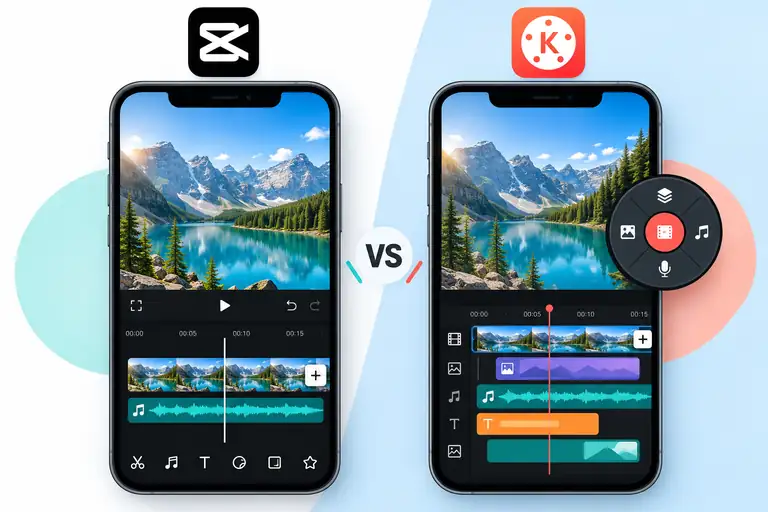
| Layer editing | Combine video, text, pictures, and audio | Arrange video, text, pictures, and audio in layers |
| Audio tools | Music, sound effects, and voice recordings | Music, sound effects, and voice recordings |
| Free and paid options | Free tools with paid features and assets | Free tools with a Premium subscription |
| Main platforms | Mobile, desktop, and web | Android and iOS phones and tablets |
Effects, Filters, and Templates
CapCut: You can use filters to change the mood of a video. Effects and text animations help highlight important moments. Templates provide a starting point when you want to edit quickly.
KineMaster: You can also add filters, transitions, effects, and animated elements. KineMaster offers templates too, so you do not always need to build a project from the beginning. Some assets require Premium.
Editing Controls
CapCut: You can make simple edits or explore tools for more detailed projects. Its captions, speed controls, and creative options give you several ways to shape a video.
KineMaster: Its layer controls help you place different items on the screen. For example, you can show a product video, add your logo above it, and include a voice recording underneath.
Neither app is limited to one type of creator. Both beginners and experienced editors can use them.
Performance and Export
CapCut: Editing speed depends on your device, project size, and the tools you use. A short video with a few clips will usually need fewer resources than a long project with many effects.
KineMaster: Performance also depends on your device and project. Adding many layers or working with large video files can make editing more demanding.
Both apps offer high-resolution export options. However, available settings can depend on your device, app version, and plan. KineMaster also notes that a device’s ability to record 4K does not always mean it can edit and export 4K in the app.
Ease of Use for Beginners
CapCut: Templates can help you get started with fewer editing decisions. You can also learn the basic tools by making a short project with a few clips.
KineMaster: Basic cuts and text are easy to explore, but working with several layers may take practice. Start with one video track and add more elements as you learn.
The easiest app is the one whose layout makes sense to you. Try the same small project in both before choosing.
Frequently Asked Questions (FAQs)
Which app is better for beginners, CapCut or KineMaster?
CapCut is generally easier for beginners because of its simple layout and wide selection of ready-to-use video templates.
Does KineMaster or CapCut leave a watermark on exported videos?
CapCut lets you remove the ending watermark for free. KineMaster adds a watermark on the free version, which requires a Premium subscription to remove.
Can I use CapCut and KineMaster on a PC?
CapCut has an official desktop app for Windows and Mac, while KineMaster is designed primarily for mobile devices and requires an Android emulator to run on PC.
Final Words
- CapCut is ideal for quick social media edits, trending templates, and cross-platform work on mobile or PC.
- KineMaster is great for creators who want traditional timeline multi-layer control on mobile phones and tablets.
- Both apps offer free features to get started, so test the same short video project on both before choosing.
- Choose the editor whose layout feels most comfortable and easy for your personal workflow.